
When you’re building out a video surveillance system, the specs can feel overwhelming fast. You’ll need to become familiar with terms such as bitrate, resolution, and frame rate. Each one sounds important on its own, but what actually matters is how they work together and what happens when your infrastructure can’t support all three at once.
Get the balance wrong, and you’ll either burn through storage, choke your network, or end up with footage that can’t do the job it was installed for. Understanding these trade-offs upfront saves time, money, and a lot of frustration down the road.
What is Resolution in a Surveillance Camera System?
Visit any surveillance video reseller site, and you’ll see them claim that a well-deployed surveillance camera system can reduce crime by 50% or more. And here’s the thing. We tend to agree with this statistic, and the rationale is quite simple. When a would-be offender spots a camera, the psychological calculus shifts quickly. The perceived risk of getting caught is often enough to change behavior before anything happens.
Of course, a camera only delivers on that promise if the footage it captures is actually usable. That starts with understanding resolution and how the choices you make around it affect everything from image clarity to storage costs to the network that carries all that data.
What is Video Resolution?
Resolution refers to the number of pixels that make up a camera’s image. The more pixels captured, the more detail the footage contains. You’ve likely seen specs like 720p (1280×720 pixels), 1080p (1920×1080 pixels), 4MP (roughly 2688×1520 pixels), and 4K (3840×2160 pixels).
Each step up delivers a sharper, more detailed image, which sounds like a clear improvement until you consider what it entails. Higher-resolution footage requires significantly more storage space and consumes more bandwidth for transmission. A single 4K camera can require three to five times as much storage as a 1080p camera capturing the same scene, so resolution decisions have real infrastructure consequences.
When Higher Resolution Makes Sense
Some locations genuinely require the detail that higher resolution provides. Retail cash registers benefit from cameras that can read transaction amounts or capture a clear image of a person’s face at close range. School entrances need enough detail to identify individuals and verify credentials.
Parking lots present a different challenge, covering large distances where faces and license plates can be difficult to read due to insufficient pixel density. License plate capture often requires dedicated high-resolution cameras, since the difference between a readable and unreadable plate can be as little as a few pixels.
In these cases, investing in a higher resolution system can really pay off.
When Lower Resolution May Be Acceptable
Not every camera in a system needs to capture fine detail. Hallway overviews, for example, are typically used to establish presence and direction of movement rather than identify individuals, making 1080p or even 720p more than sufficient.
General activity monitoring in break rooms, warehouse aisles, or loading docks often serves the same purpose. Low-priority areas where the footage is unlikely to be reviewed unless an incident occurs represent another case where lower resolution reduces storage overhead without a meaningful trade-off in usefulness.
Matching the right resolution to each camera’s actual purpose is one of the better ways to keep a system cost-efficient.
What is Frame Rate and Motion Capture?
Resolution tells you how much detail a camera can capture. Frame rate determines whether that detail holds up when something is actually moving. For surveillance systems, the difference between 10 frames per second and 30 frames per second can mean the difference between identifying a subject and watching a blur.
What Does Frame Rate Mean?
Frame rate refers to how many individual images a camera captures per second, expressed as FPS (frames per second). The higher the number, the more fluid and continuous the recorded motion appears.
Common surveillance rates include 10 FPS, 15 FPS, and 30 FPS. At 10 FPS, motion can appear choppy, and fast-moving subjects may seem to jump between positions. At 30 FPS, footage plays back much closer to what the human eye perceives as natural motion.
Choosing the right frame rate is not always about capturing the smoothest possible video. It is about matching the camera’s capture speed to what is actually happening in the scene.
Why is Frame Rate so Important in Video Surveillance?
Frame rate directly affects whether footage can be used as evidence or for identification. Schools monitoring fast-moving hallways need enough frames per second to track individuals as they move through a crowded space.
Casinos and retail checkout lanes rely on higher frame rates to capture hand movements and transaction details that would otherwise be lost between frames. Public safety intersections benefit from 30 FPS when reviewing traffic incidents, where a vehicle’s position can change dramatically from one second to the next.
Warehouses with forklifts and heavy equipment pose a safety-monitoring challenge. At lower frame rates, a fast-moving forklift can appear to teleport across the frame, making incident reconstruction difficult.
The Storage Trade Off
Every additional frame captured per second adds to the size of the video file being stored. A camera recording at 30 FPS generates roughly three times as much data as the same camera recording at 10 FPS, assuming all other settings remain constant.
That data has to travel somewhere. Higher frame rates place greater demands on bandwidth and can put real stress on wireless backhaul systems, particularly in facilities where multiple high-frame-rate cameras are transmitting simultaneously.
This is where infrastructure planning matters as much as camera selection. Organizations that deploy high-frame-rate cameras without first evaluating their network capacity often find that footage quality degrades precisely when they need it most, which is a problem EMCI Wireless helps clients get ahead of before installation begins.
What Bitrate Does and Why It Impacts Everything
Resolution and frame rate often get the most attention when organizations are spec’ing out a camera system. Bitrate, however, is what actually controls how much of that visual information makes it through the pipeline intact. Get the bitrate wrong, and even a 4K camera at 30 FPS will deliver footage that looks worse than a well-configured 1080p system.
What Exactly is Bitrate?
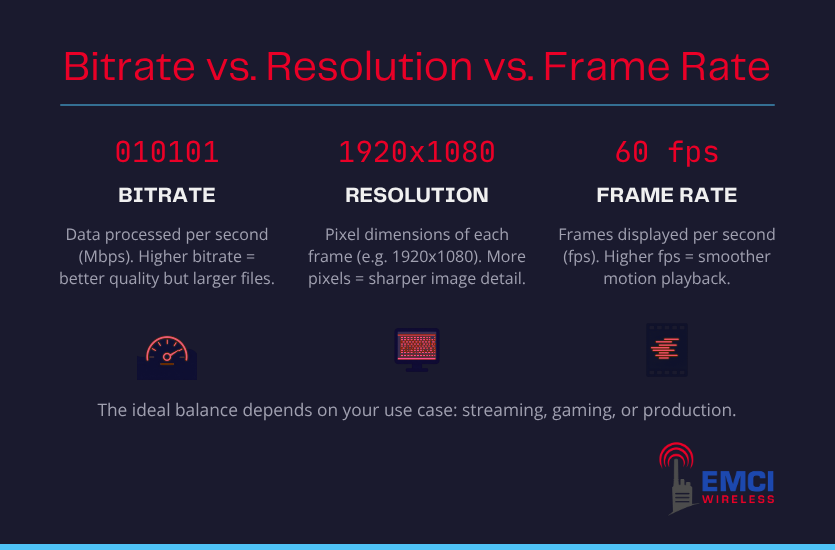
Bitrate refers to the amount of video data transmitted or recorded per second, typically measured in megabits per second (Mbps). Think of it as the pipe carrying your video signal. A wider pipe means more data can flow through, which generally translates to sharper, more accurate footage.
A camera set to 2 Mbps is transmitting far less data than one set to 8 Mbps, and the difference shows up in the image. Fine details like text on a sign or features on a face tend to fall apart first when the bitrate is too low.
The Relationship Between Bitrate and Compression
Video compression is what makes surveillance footage manageable in terms of file size. The two most common standards are H.264 and H.265. H.265 is the newer of the two and can deliver comparable image quality at roughly half the bitrate, which matters significantly when you are managing a large camera system.
Compression always involves trade-offs, though. Aggressive compression at a low bitrate can introduce visual artifacts, producing footage that looks blurry or blocky, particularly during fast motion or in low-light conditions. Setting the bitrate too low to save storage space can quietly undermine the quality of the footage you depend on.
Why Does Bitrate Impact Bandwidth?
Each camera on a network is constantly generating and transmitting data. As camera counts increase, so does the total traffic load on the network. A facility running 20 cameras at 6 Mbps each is pushing 120 Mbps of video traffic at any given moment, before accounting for any other network activity.
Remote viewing adds another layer of demand. When users access live or recorded footage from off-site, that data has to travel across the wider network, compounding the load. Wireless systems that were not sized for these demands can struggle to keep up, leading to dropped frames, delayed feeds, and degraded footage quality.
How Bitrate, Resolution, and Frame Rate Work Together
Bitrate, resolution, and frame rate don’t operate independently. Think of each as a link in a chain. If you change one link, it impacts the others.
Higher resolution produces more pixel data per frame. Higher frame rates multiply that data by capturing more frames per second. Bitrate determines how much of that combined data actually gets transmitted and stored faithfully. Push all three to their maximums without the infrastructure to support it, and something gives, usually in the form of overloaded storage, network congestion, or degraded footage quality.
The goal is calibration, not maximization. And every environment has different demands. Here is how the variables tend to shake out across some of the most common surveillance deployments.
| Environment | Resolution | Frame Rate | Bitrate Priority | Primary Goal |
| Retail (checkout) | 1080p | 15 FPS | Moderate | Facial ID and transaction monitoring |
| School entrances | 4MP | 15-30 FPS | Moderate-High | Access monitoring and identification |
| School classrooms | 1080p | 10 FPS | Lower | General activity oversight |
| Public safety/traffic | 4K | 30 FPS | High | Incident response and plate capture |
| Warehouse/hallways | 1080p | 10-15 FPS | Lower | Movement tracking, low-detail review |
Common Mistakes Organizations Make with Surveillance Video Settings
Configuring a surveillance system involves more decisions than most organizations anticipate, and a few missteps recur across industries. These are the ones you need to know before you deploy.
- Same settings across every camera. Not every location has the same needs, and blanket configurations waste storage in some areas while underserving others.
- Under-configuring cameras in areas that matter. Low resolution and 10 FPS can seem fine until an incident occurs, and the footage cannot support an investigation.
- Ignoring cumulative bitrate. One high-bitrate camera is manageable. Twenty transmitting simultaneously is a different problem entirely.
- Adding cameras without revisiting infrastructure. What supported eight cameras rarely scales to thirty, and the gaps tend to show up at the worst possible time.
EMCI Wireless Supports Surveillance Network Performance
A camera system is only as reliable as the network supporting it. And this might seem like an obvious concept, but the execution is where many deployments run into trouble.
EMCI Wireless approaches surveillance as a complete infrastructure problem, not just a hardware selection. Before recommending cameras or configurations, we are happy to conduct a site survey to understand how your facility’s physical environment affects signal transmission. Building materials, layout, interference sources, and existing network capacity all factor into what a deployment can realistically support.
This matters more as systems grow. Organizations adding cameras to an existing network often discover that decisions around video bitrate, resolution, and frame rate create infrastructure demands that the existing network was never sized to handle, particularly in older facilities or buildings with complex floor plans.
We also work with clients on video management infrastructure, helping match storage solutions and network architecture to the specific configuration demands of their camera systems.
The goal is a system where every camera performs as it was configured, consistently across the full deployment, not just at installation.
Getting the Configuration Right From the Start
Video bitrate, resolution, and frame rate are not settings you configure once and forget. They are interdependent variables that shape how useful your surveillance system actually is when you need it most. Too much in the wrong places strains your network and storage. Too little in the right places leaves you with footage that cannot do its job.
The organizations that get this right are not necessarily the ones with the biggest budgets. They are the ones who treat camera configuration and network infrastructure as two sides of the same coin. That is the approach EMCI Wireless brings to every deployment, from single-site retail locations to multi-campus school districts to public safety installations across Florida.
If you are planning a new system or expanding an existing one, we would welcome the conversation. Reach out to our team at EMCI Wireless team to schedule a free consultation.
Frequently Asked Questions
What is a good bitrate for surveillance cameras?
For most standard surveillance applications, a bitrate between 2 Mbps and 8 Mbps per camera covers a wide range of needs. Lower-activity areas with 1080p cameras can often operate well at 2-4 Mbps. High-detail environments using 4MP or 4K cameras, particularly those requiring clear identification, typically benefit from 6 Mbps or higher. The right number depends on resolution, frame rate, and what the footage needs to capture.
Does higher resolution always mean better surveillance footage?
Not necessarily. Higher resolution delivers more detail, but only if the bitrate is set high enough to support it and the network can handle the increased data load. A 4K camera running at a low bitrate can produce footage that looks worse than a properly configured 1080p camera. Resolution is one part of the equation, not the whole answer.
How do I know if my network can support my surveillance system?
The most reliable way is to calculate your total bandwidth demand before deployment. Add up the bitrates of all cameras running simultaneously, factor in any remote-viewing requirements, and compare the total against your available network capacity.
If you are working with a wireless infrastructure, physical environment factors such as building materials and layout can significantly affect actual throughput. A professional site survey, like the ones EMCI Wireless conducts, takes the guesswork out of that process.