
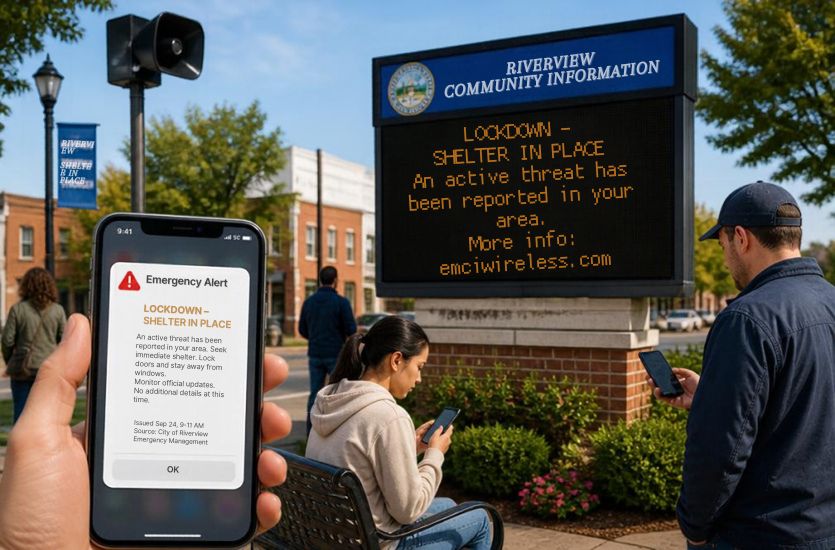
As a nation, we have faced some brutal catastrophes. From severe weather to chemical spills to terrorist attacks, we’ve seen more than our fair share. Each of these events has taught us something about how people communicate when every second matters.
An emergency message can contain exactly the right instructions. But if it never reaches the people in danger, it cannot help them. Employees may be at a desk, on a jobsite, inside a warehouse or sky scraper, or carrying a two-way radio miles away. A mass notification system addresses that challenge by sending urgent information through multiple communication channels at once. The goal is simple. Get the right message to the intended people when they need it most.
Quick Answer: What Is a Mass Notification System?
A mass notification system is a communication platform that sends urgent messages to large groups of people through several channels at the same time. One alert can be delivered by text message, phone call, email, desktop notification, digital signage, in-building speakers, and connected two-way radios. Organizations can send alerts to everyone or target specific buildings, departments, shifts, or locations. This gives emergency instructions more than one path to reach employees, visitors, field crews, and other people who may need to act quickly.
What Does a Mass Notification System Actually Do?
You’re likely familiar with the phrases one to one and one to many. One to one communications are exactly as it sounds: one person communicating to one other person. One to many, on the other hand, is about getting one person’s message out to everyone who needs to hear it.
That is the basic idea behind a mass notification system. An authorized person sends one message, and the system distributes it through several communication channels. Organizations can use these alerts during situations such as:
- Severe weather
- Building evacuations
- Shelter-in-place orders
- Security threats
- Active assailant situations
- Hazardous material incidents
- Power or network outages
- Facility closures
- Missing persons
- Operational disruptions
But not every message needs to go to everyone.
A mass alert may be sent across an entire business, campus, school, hospital, or government facility. For example, an approaching tornado could require everyone on the property to move to designated shelter areas.
A targeted alert goes only to the people affected by a specific situation. A company could notify employees in one building about a gas leak without sending the same message to workers at another location. Alerts can also be directed to certain departments, shifts, teams, or geographic areas.
Motorola Solutions Rave Alert gives organizations several ways to distribute those messages. Alerts can be sent through text, email, voice calls, desktop notifications, digital signage, public address systems, and other communication channels.
How is a Mass Notification System Different from a Fire Alarm or Public Address System?
When you think of a mass notification system, something like a fire alarm or a public address (PA) system probably comes to mind. And in reality, these systems are intended to enable getting a message out to a large volume of people. But, the purposes are different.
Here is a simple comparison table that explains the key differences between fire alarms, PA systems, and mass notification systems.
| System | Main Purpose | Who It Reaches | How It Communicates |
| Fire alarm | Warn people about a fire or fire-related emergency | People inside or near the building | Horns, sirens, strobes, and sometimes recorded or live voice instructions |
| PA system | Broadcast spoken announcements | People within range of the speakers | In-building or outdoor speakers |
| Mass notification system | Send emergency or operational instructions during many types of incidents | People on-site, off-site, or in specific groups and locations | Text, voice, email, desktop alerts, digital signage, speakers, radios, and other connected channels |
The biggest difference between these three systems boils down to reach. A fire alarm or PA system generally depends on someone being close enough to hear or see the warning. A mass notification system can send the same information through several channels.
The differences here really come into play when employees are spread across a large property or working away from the main building. Someone in an office may see a desktop alert. A field employee may receive information through a mobile device or two-way radio. Employees elsewhere on the property may hear instructions over speakers.
Rather than relying on one method, organizations can give an emergency message several ways to reach the people who need it.
How Does an Emergency Notification System Reach People?
This all begs the question: How does an emergency notification system actually reach the people who need to receive the message?
The answer depends on where those people are and what communication tools they are using when the emergency occurs. That is why a mass notification system can send the same message across several channels at once.
Text Messages
Text messages put short instructions directly on employees’ mobile phones. An organization might send an evacuation order, tell employees where to shelter, announce a facility closure, or ask recipients to confirm that they received the alert.
Voice Calls
Voice calls provide another way to reach people who may not see or respond to a text. Recorded messages can be sent to mobile phones and landlines with spoken instructions about what has happened and what recipients should do next.
Email works well when an organization needs to provide more information than can fit comfortably in a text. Messages can include follow-up instructions, schedules, maps, building information, or updates employees may need to reference later.
Desktop Alerts
Desktop notifications can appear directly on computers used in offices, control rooms, dispatch centers, and other work areas. This can put an emergency message in front of employees even if they are not checking their email or phone.
Digital Signage
Digital signs and displays can also become part of an emergency notification system. During an incident, they can display evacuation routes, shelter instructions, building closures, or other warnings in areas where employees and visitors can see them.
Radio All-Call and Two-Way Radio Alerts
Of course, not everyone spends the workday sitting in front of a computer or checking a company phone. Security officers, maintenance teams, warehouse employees, field crews, and facility staff may rely on two-way radios throughout their shifts.
Connecting emergency notifications with radio communications gives organizations another way to reach these workers. An all-call or radio alert can put urgent information on a device employees are already carrying and listening to as they work.
In-Building Speakers
In-building speakers can broadcast spoken instructions to people throughout a facility. They remain especially useful because occupants do not have to open a message, answer a phone, or look at a screen to receive the warning.
Rave Mobile Safety can distribute information through channels such as SMS, email, voice calls, desktop notifications, digital signs, and public address systems. Using several communication paths means an organization does not have to depend on a single device or method to get an emergency message out.
What 9/11 Taught Us About Messages That Never Arrive
The September 11, 2001 terrorist attacks on our country will forever remain in our memories and hearts as we mourn all that our country lost. But in the communications space in particular, that historic day has taught us lessons that we never knew we needed to receive.
Shortly after Flight 11 struck the North Tower, the acting fire safety director ordered an evacuation. But the building’s public address system had been damaged. According to the 9/11 Commission, apparently no one heard the announcement.
That moment revealed a painful truth. Sometimes the problem is not that an emergency decision was never made. The problem is that the message never reaches the people who need it.
The Commission also documented evacuation instructions that were transmitted over radio channels other commands or agencies could not hear. Today, that history helps explain why emergency communications rely on multiple paths instead of assuming one speaker, radio channel, or device will reach everyone.
Where Does NFPA 72 Fit Into Mass Notification?
Mass notification systems are part of a broader emergency communications framework. NFPA 72, the National Fire Alarm and Signaling Code, addresses fire alarm systems along with emergency communications systems, including mass notification.
The standard covers areas such as system design, message delivery, testing, and reliability. It also connects with other life-safety communication requirements, including NFPA 72 requirements for emergency responder communication systems.
The larger takeaway is that mass notification is not a stand-alone tool. It works as part of a coordinated approach to getting emergency information where it needs to go.

What About Employees Who Are Working on a Radio?
People across the U.S., and particularly the state of Florida, hold numerous jobs, and that means that not all jobs have someone working at a desk or checking a company phone (or email) all day. Security officers, maintenance crews, warehouse staff, field workers, and facility teams may rely on two-way radios throughout their shifts.
That is why radio integration matters. An emergency alert should be able to reach employees through the communication tools they already use, whether that means a text, desktop notification, or radio message.
This same principle applies across public safety communications. FirstNet and land mobile radio can serve different roles while working alongside one another, giving teams more than one way to communicate during an incident.
The same is true when outside agencies respond. Mutual aid channels give responders from different departments a shared place to communicate, while a mass notification system helps deliver instructions to employees, occupants, and other affected groups.
What Happens When Alerts Connect With Access Control and Video?
Today’s technology makes mass notification systems so much more powerful than they used to be. That’s because a mass notification system becomes even more useful when it connects with access control and video security systems. Instead of only sending a warning, an alert can also help trigger specific actions.
For example, a security event at a restricted entrance could prompt the system to notify staff, lock selected doors, display nearby camera feeds, and send instructions to employees or security teams.
Video can give responders a clearer picture of what is happening and where. Access control can help limit movement into or out of certain areas. At the same time, alerts can tell employees whether to evacuate, shelter in place, or avoid a specific part of the property.
The exact response depends on how the systems are configured, but the goal is the same. Communication and physical security can work together instead of operating as separate systems.
How Motorola Rave Alert Brings Those Communication Paths Together
Earlier, we touched on Motorola Rave Alert and this is where that technology really enters the picture. To offer some clarity, Rave Alert is a cloud-based mass notification system that lets organizations send emergency and operational messages from one central platform.
Based on how the system is configured, a single alert can reach people by text message, email, phone call, desktop alert, digital display, PA system, social media, and other connected communication tools. Organizations can send a message broadly or target specific groups, locations, or people based on the situation.
Rave Alert also supports follow-up messaging and polling, which can help organizations collect responses after an alert is sent.
For a business, that means one warning can travel through several communication paths instead of relying on employees to be near one particular device. EMCI Wireless can help organizations incorporate Rave Mobile Safety into a larger communication and security plan that may also include radios, video, and access control.
What Should a Business Consider Before Choosing a Mass Notification System?
Choosing a mass notification system for business starts with understanding how and where your people work. That matters because emergencies rarely happen under perfect conditions. Employees may be spread across buildings, working outside, driving between sites, or away from a computer when an alert goes out. Businesses need a system that can account for those differences and give urgent information more than one way to reach the people who need it.
Here are some questions to ask:
- Who needs to receive alerts?
- Are employees spread across several buildings or job sites?
- Which workers depend on two-way radios?
- How often do employees check phones or email?
- Do you use digital signage or in-building speakers?
- Should alerts connect with video or access control?
- Do certain departments, shifts, or locations need targeted messages?
- Who will have permission to send alerts?
- How will the system be tested?
The goal is not simply to send more messages. It is to create several reliable ways to reach people when an emergency occurs.
Build an Emergency Communication Plan That Reaches Beyond One Device
We learned a tough message on September 11, 2001. An emergency message only helps if the people who need to hear it, get the message. That’s why relying on one speaker, one phone, or only one communication channel can result in gaps at the most inopportune times.
A mass notification system gives businesses several ways to reach employees, visitors, field teams, and others during an emergency. When those alerts connect with radios, video, access control, and other communication tools, businesses can create a more complete response plan.
EMCI Wireless can help you bring those systems together with Motorola Rave Alert and other communication technologies. Contact our team to talk through your current setup and the best path forward.