
Over the last few decades, we’ve learned that emergencies happen in the places that we want to be the safest. We’re talking about schools. Everytown Research & Policy reports that since 2013, there have been 1,683 incidents of gunfire on school grounds. But that’s not the most alarming number. It’s that those incidents have resulted in 1,231 injuries and 544 deaths nationally.
It begs the question: What are schools doing about it? Thankfully, states are responding by introducing laws to help schools communicate more quickly with emergency responders. One of those laws is Alyssa’s Law, which requires Florida public schools to have mobile panic alert systems that connect with local emergency services.
But what does Alyssa’s Law compliance look like in Florida today? And how have recent changes affected the requirements? Let’s look at what schools need to know, how school panic button technology works, and what administrators should consider when reviewing their emergency communication systems.
What is Alyssa’s Law?
Alyssa’s Law is one of those pieces of legislation that we wish we never needed, but in reality, we do. It was named in memory of Alyssa Alhadeff, a 14-year-old student who was killed during the 2018 shooting at Marjory Stoneman Douglas High School in Parkland, Florida.
Following the tragedy, Alyssa’s parents, Lori and Ilan Alhadeff, established the nonprofit organization Make Our Schools Safe. Their mission is to improve school safety and advocate for legislation that can help protect students and staff.
Alyssa’s Law requires schools to have silent panic alert systems that allow personnel to request law enforcement assistance without drawing attention to themselves. These alerts can help responders act quickly while notifying designated school personnel of an emergency.
New Jersey became the first state to adopt Alyssa’s Law in 2019, followed by Florida in 2020. Since then, 13 states have adopted the legislation.
What Does Alyssa’s Law Require in Florida?
As a Motorola Solutions partner and organization focused on improving communication for businesses across southern and central Florida, we understand how important reliable emergency communication systems are. We also know that understanding the technology and the laws surrounding it can be confusing. That’s why we want to help school administrators and safety directors understand what Alyssa’s Law requires and how their schools can meet those requirements.
Which Schools Must Comply?
Alyssa’s Law applies to all Florida public schools, including charter schools. Passed in 2020, the law required schools to begin implementing mobile panic alert systems during the 2021–2022 school year.
The Florida Department of Education indicates that school districts can select a system through a state contract or use local funds to purchase another solution that meets the law’s requirements. This gives districts some flexibility in choosing technology that works for their schools.
What Must the Panic Alert System Do?
Under Florida Statute 1006.07(4), public schools must have a mobile panic alert system that connects with local 911 infrastructure. This gives school staff a quick way to call for help and provides first responders with the information they need to act.
More specifically, Florida requires schools and districts to meet several requirements.
- Silent activation. Staff must be able to activate a panic alert discreetly and easily during an emergency.
- 911 integration. The system must connect with local public safety answering points (PSAPs) to transmit 911 calls and mobile panic alerts.
- Emergency coordination. Districts must work with county 911 authorities and local emergency management offices when developing their alert procedures.
- System testing. Schools must follow a testing schedule to check communication system functionality, coverage, and signal strength throughout campus.
- Documentation and reporting. Districts must maintain current records of their schools’ panic alert systems and report failures to connect with emergency dispatch within the required timeframe.
Schools can use a combination of mobile apps, fixed panic buttons, desktop applications, and wearable devices to give staff access to emergency alerts. The goal is to let school personnel request help quickly, wherever they are on campus.
What Changed for Florida Schools in 2025 and 2026?
Since the law rolled out in 2020, there have been some changes as recent as the last two years.
In 2025, Florida passed Senate Bill 1470, which expanded the state’s school safety requirements. The legislation called for creating Florida’s Statewide Centralized Alert Platform (FLSCAP), a system designed to bring emergency alerts from different school panic button providers into one place. Then, on May 29, 2026, the Florida Department of Education announced that SaferWatch had been selected to implement FLSCAP.
These changes are intended to make communication easier for law enforcement and emergency dispatch personnel. Instead of monitoring several different systems, 911 operators can receive school panic alerts, location information, and digital school maps through one centralized platform. This gives emergency responders more information about what’s happening and where assistance is needed.
Under the updated requirements, all Florida public schools, including charter schools, must connect their existing panic alert systems to FLSCAP.
For administrators, this means a school panic button system may not be enough. Schools should review their current technology and confirm that it meets the state’s newer integration requirements.
What Does a School Panic Button System Look Like in Practice?
Anyone reading this article is probably nodding, agreeing that all of this sounds like a smart idea. After all, we can all agree that we want our schools to be safe places for Florida’s children. But what does this really look like in practice? And can it actually do what it’s meant to do?
The technology behind these systems may sound complicated, but the basic idea is fairly simple. When an emergency occurs, school personnel need a fast, discreet way to request help and notify the right people. Let’s break down how that works without getting too technical.
Mobile Panic Button Apps
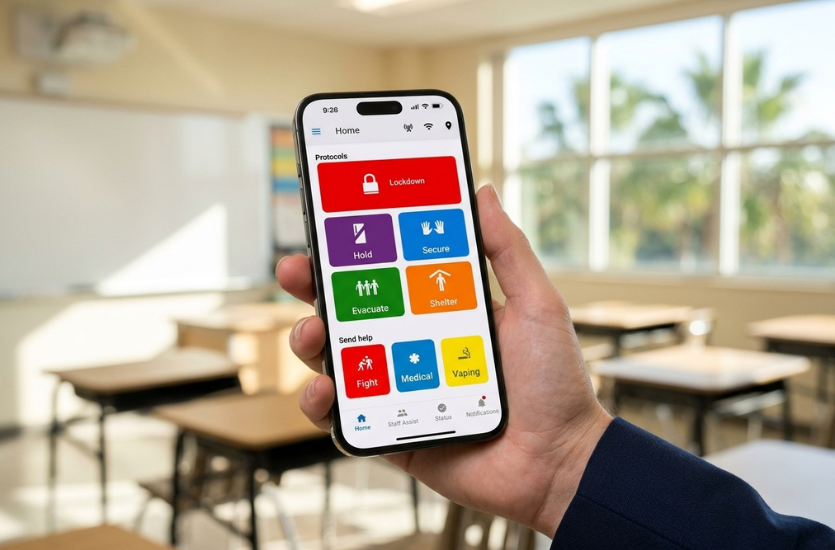
Many school panic button systems use smartphone apps that authorized teachers, administrators, and other staff members can access. With just a few taps, they can send an emergency alert without making a phone call.
Depending on the system, staff may be able to select the type of emergency, share their location, and provide additional details. This information can help emergency responders understand the situation before they arrive.
Wearable and Fixed Panic Buttons
Of course, school employees may not always have their phones within reach. Wearable and fixed panic buttons are excellent options for most schools.
Staff members can carry or wear wearable buttons, allowing them to request assistance without reaching for a phone. Schools can install fixed buttons in classrooms, administrative offices, and reception areas.
Some schools may benefit from using a combination of these devices, depending on their campus layout, staffing, and communication needs.
Direct Communication With 911 and School Personnel
Let’s say a teacher notices a potentially dangerous situation on campus. Rather than calling the front office or trying to reach someone by phone, the teacher activates the school panic button.
Depending on how the system is configured, that action can connect to 911 while sending notifications to designated school administrators and staff. Emergency responders may also receive information about the alert location, the nature of the emergency, and relevant facility details.
This lets school personnel and emergency responders begin coordinating without waiting for information to pass through several people.
The exact process depends on the technology being used and how it connects with local 911 services. That’s why proper installation, system testing, and staff training are key parts of a school’s emergency communication plan.
One example of technology that brings these capabilities together is Motorola Solutions’ Rave panic button. This mobile application allows authorized school personnel to contact 911 with the push of a button while simultaneously notifying designated staff members. It can also provide emergency responders with information about the situation and school location.
As a Motorola Solutions partner, EMCI Wireless helps Florida organizations understand their emergency communication options. Let’s take a closer look at how the Rave panic button works and how it can support a school’s safety planning.
How Motorola Solutions Rave Panic Button Supports School Emergency Communication
The Rave panic button that we just introduced is one solution that Florida schools can consider. It offers several features that can help schools prepare for emergencies, communicate with responders, and manage incidents as they unfold.
Beyond the basic panic button function, Rave offers the following capabilities.
- Emergency categories. Staff can identify the type of emergency, such as a fire, medical incident, or security threat.
- Location information. Equipped 911 centers can receive campus maps, floor plans, and other facility details.
- Staff Assist. Authorized employees can communicate about situations that don’t require a 911 call.
- Status checks. Administrators can request updates about injuries, missing students, or areas needing assistance.
- Drill management. Schools can conduct emergency drills and track activities for reporting purposes.
- Connected technology. Rave can work with other Motorola Solutions products, including wearable panic buttons and mass notification systems.
As a Motorola Solutions partner, EMCI Wireless can help Florida schools evaluate the Rave Panic Button and determine how it fits into their existing emergency communication plans.
How Panic Alerts Work With a School’s Other Safety Systems
One area of particular concern for schools implementing panic button technology is making sure it works with other safety systems already in place. We get it. School budgets are often constrained, and while Florida law requires public schools to have a mobile panic alert system that connects with local emergency services, it doesn’t require schools to replace all their existing safety equipment.
Fortunately, many panic alert solutions can work alongside technology schools already use.
For example, Motorola Solutions’ Rave Panic Button can work with Rave Alert, a mass notification system that helps schools share emergency updates through multiple communication channels. Of course, having the right technology is only part of preparing for an emergency. Our guide on building an emergency communication plan explains how to assign staff responsibilities, establish backup communication methods, and test procedures before an emergency occurs.
It’s all about making better use of existing technology while improving communication between staff, administrators, and emergency responders.
How Has Alyssa’s Law Spread to Other States?
As of September 2026, 13 states have implemented Alyssa’s Law. This list includes New Jersey, which was the first state to enact the law, as well as Florida, Georgia, Illinois, New York, Oklahoma, Oregon, Tennessee, Texas, Utah, Virginia, Washington, and West Virginia.
And the movement continues. Approximately 16 additional states are considering or advancing Alyssa’s Law or similar school safety legislation.
However, the requirements aren’t identical from state to state. Some states require schools to install silent panic alert systems, while others require districts to consider the technology as part of their safety planning.
For school administrators, this means understanding their state’s specific requirements rather than assuming one approach satisfies every state’s laws.
How Can Florida Schools Review Their Alyssa’s Law Compliance?
Of course, having the right technology is only part of preparing for an emergency.
Here’s a simple checklist to get started.
- Identify your system. Confirm which panic alert technology is installed at each school.
- Review staff access. Check that authorized personnel can use mobile apps, wearable devices, or fixed buttons.
- Verify 911 connections. Confirm that alerts reach the appropriate local emergency dispatch center.
- Check FLSCAP integration. Confirm that your school’s panic alert system is connected to Florida’s Statewide Centralized Alert Platform (FLSCAP). This platform brings alerts, location details, and digital school maps from different approved panic alert systems into one interface for emergency dispatch personnel.
- Review testing records. Check campus coverage, system functionality, and recent test results.
- Confirm staff training. Make sure employees understand how and when to activate an alert. Consider using tabletop exercises to practice emergency procedures and identify communication gaps.
- Update emergency procedures. Coordinate with local emergency management and 911 authorities.
Please understand that the above checklist is intended to be a starting point. It should not be considered a complete legal compliance audit.
Review Your School’s Emergency Communication System With EMCI Wireless
At EMCI Wireless, our goal is to help you implement an emergency communication system that is not only legally compliant but also works with your school and existing technology. We understand it can be overwhelming to think through the requirements and how they align with your current technology stack.
That’s one of the many reasons why we offer free consultations. So, if your school needs a new panic alert system or wants to review its existing setup, we’re here to help.
As a Motorola Solutions partner, we offer communication and safety solutions for schools that can work alongside your current technology. We’ll take the time to understand your needs, discuss your options, and help you determine the next steps.
Contact EMCI Wireless today to schedule your free consultation.