
Your team needs to stay connected all day. It’s simply non-negotiable. And Motorola WAVE radios are a popular choice amongst teams across Florida. But accessories can make or break the communication experience.
We’re talking about things like earpieces to enable discreet communication, remote speaker microphones, replacement batteries, and charging stations. There are plenty of accessories for the Motorola TLK series, but which ones do you actually need?
At EMCI Wireless, we know what your business needs might not match what the business down the street needs. And choosing the right accessories can be confusing. That’s why we’ve put together this guide to some of the best Motorola WAVE radio accessories. We’ve also included who can benefit and why we think you’ll want to consider them.
Remote Speaker Microphones for Hands-Free Convenience
Do your employees constantly reach for their radios throughout the day? If so, a remote speaker microphone (RSM) could help. These accessories let employees hear and respond to messages without removing their radios from their belts or wherever they’re carrying them.
For example, the Motorola TLK 110 is compatible with several remote speaker microphones, including:
- RM250 Wired Remote Speaker Microphone (PMMN4125): A wired option that connects directly to the radio.
- WM500 Wireless Bluetooth Remote Speaker Microphone (PMMN4127): A wireless option that connects via Bluetooth.
You can clip these microphones to a shirt or shoulder. That makes it easy to access the push-to-talk button when an employee needs to communicate with a coworker.
But who benefits most from these accessories? Think about security guards who need to report suspicious activity, construction supervisors who need to coordinate with their crews, or maintenance employees who are constantly moving from one task to another.
If your team needs to communicate frequently throughout the day, an RSM can be an excellent addition to their Motorola TLK 110 accessories.
Earpieces for Private and Discreet Communication
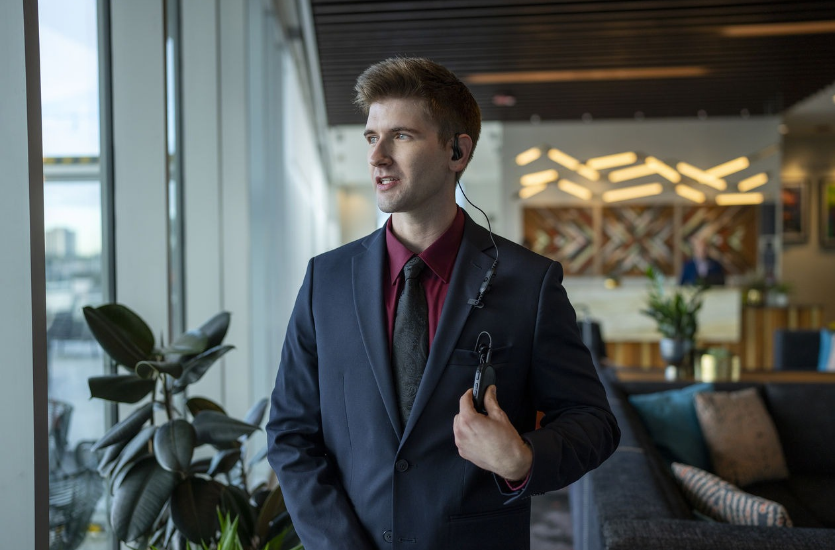
Earlier, we touched on earpieces. Some professional conversations simply shouldn’t be overheard. Think about hotel employees discussing a guest’s request or security personnel raising a concern. In these situations, an earpiece lets employees receive messages without broadcasting them to everyone nearby.
Several types of earpieces are available, so let’s look at two popular options.
Surveillance Earpieces
Surveillance earpieces typically feature a clear acoustic tube that fits discreetly in the ear. Security guards, loss prevention officers, and event staff often use them to communicate without drawing attention.
One option is the PMLN7157 2-Wire Surveillance Kit, which includes an earpiece and a combined microphone and push-to-talk function, letting users speak into the microphone at a whisper.
Swivel and D-Style Earpieces
For employees who wear an earpiece throughout their shift, comfort matters. Swivel and D-style earpieces fit around the outside of the ear rather than sitting deep inside it.
Here’s what to consider:
- PMLN7189 Swivel Earpiece: Features an over-the-ear design with an inline microphone and push-to-talk button.
- PMLN7159 Adjustable D-Style Earpiece: Offers an adjustable fit for employees who prefer an earpiece that rests around the ear.
These can be practical choices for hotel staff, restaurant managers, retail employees, and healthcare workers who need to stay connected while interacting with customers, guests, or patients.
Replacement Batteries for the Motorola TLK 110
Though we might wish that batteries lasted forever, they just don’t. The last thing you want is an employee’s radio to run out of battery before their shift ends. This can hurt the business when your team needs to stay in communication.
The Motorola TLK 110 uses a PMNN4578 2500 mAh lithium-ion battery, which can provide up to 18 hours of battery life, depending on usage. That’s plenty of time for many employees, but what about those working extended shifts or sharing radios with coworkers?
Having replacement batteries on hand can prevent unexpected interruptions. This is especially helpful for security personnel, warehouse employees, construction crews, and maintenance teams who rely on their radios throughout the day.
If your business uses older TLK 100 radios, check battery compatibility before buying replacements.
Single and Multi-Unit Chargers for Easier Radio Management
Speaking of batteries, let’s talk about chargers. After all, even the best batteries won’t help much if employees don’t have a convenient way to charge them.
If your business uses only a few Motorola TLK 110 radios, you may only need individual charging solutions, such as compatible USB-C cables and wall adapters. But what if you’re managing a larger team with dozens of radios?
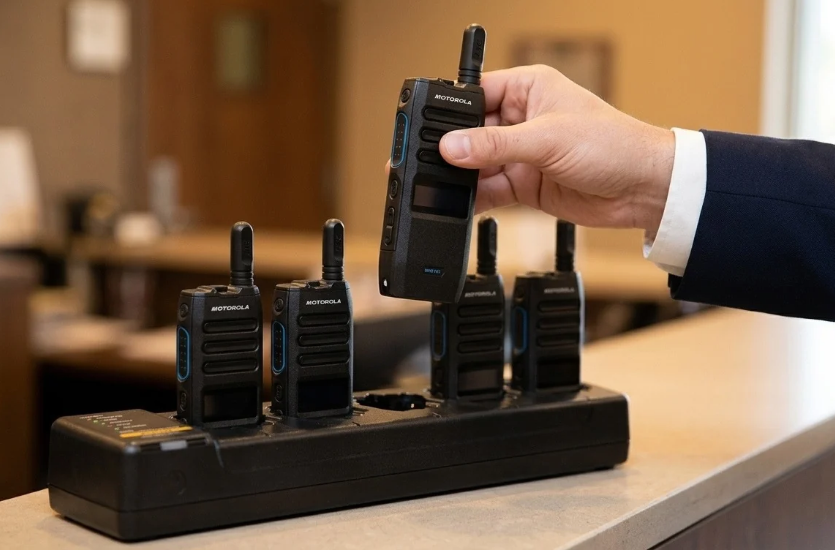
That’s where multi-unit chargers come in. For example, the Motorola TLK 110 Six-Pocket Multi-Unit Charger (PMLN8569) lets you charge up to six radios in one place.
This can be especially helpful for hotels, warehouses, security departments, and distribution centers where employees share equipment or work different shifts.
Having a designated charging station also makes it easier for employees to return their radios at the end of the day, so the next shift can start with charged equipment.
If you’re purchasing Motorola TLK 100 accessories for older radios, remember to check charger compatibility first. Different TLK models may require different charging equipment.
Holsters, Belt Clips, and Carry Accessories
Your employees need to keep their hands free. When they need to get work done, they don’t want to stop to figure out what to do with their radio. That’s why you’ll want to invest in holsters, belt clips, and other carrying accessories.
These accessories let employees keep their radios within reach while freeing their hands for other tasks. Depending on the job, you have several options.
For example, here are two popular Motorola TLK 110 accessories:
- PMLN8439 TLK 110 Carry Holster with Swivel Belt Clip: Lets employees securely carry their radio on a belt and adjust its position for comfort.
- PMLN7128 Heavy-Duty Swivel Belt Clip: Provides another carrying option for employees who need frequent access to their radios.
Wrist straps may also be useful for employees who prefer to carry their radios by hand.
These accessories are particularly helpful for security guards, technicians, groundskeepers, maintenance workers, and warehouse employees. Just remember to check compatibility with your specific TLK model before purchasing.
Vehicle Mounting Accessories for the Motorola TLK 150
What about employees who spend most of their workday on the road? That’s where the Motorola TLK 150 can be super handy. This mobile WAVE PTX radio is designed for vehicle-based communication, making it a popular choice for delivery companies, trucking fleets, utility providers, and field service teams.
But where should the radio go? Vehicle mounting accessories can help. These brackets and installation kits allow businesses to position their radios in convenient locations.
Here’s what we think you might want to consider:
- RLN6466 Low Profile Mounting Bracket: A compact mounting option for tighter spaces.
- RLN6467 High Profile Mounting Bracket: Provides additional mounting clearance.
- RLN6468 Key Lock Mounting Bracket: Helps prevent unauthorized radio removal.
- FTN6083 In-Dash Mounting Kit: Allows for installation within a vehicle’s dashboard.
We might want to think about professional installation. You’ll want the radio mounted somewhere that’s easy to access without blocking the driver’s view or interfering with vehicle controls. The way we see it, and we think you’ll agree, staying connected shouldn’t come at the expense of safety.
External Antennas for Motorola TLK 150 Radios
Are your employees spending a big portion of their day traveling between job sites? How about covering large service areas? If so, you’ll want to think about antennas. The location and type of antenna you use can affect how your Motorola TLK 150 radio performs.
Consider these two options.
- AN000358A01 LTE Dash/Glass Mount Antenna: Supports the cellular network connection used for WAVE PTX communication.
- AN000359A01 GNSS (GPS) Dash/Glass Mount Antenna: Supports location tracking by receiving satellite positioning signals.
These accessories can be especially helpful for transportation fleets, mobile security patrols, delivery drivers, and utility crews who rely on communication while traveling.
Of course, proper installation matters, too. Place both antennas in appropriate locations inside the vehicle and connect them to the correct ports. And while the right antenna setup supports reliable communication and location tracking, it won’t eliminate every cellular coverage gap.
Accessories for the Motorola TLK 25 Wearable Device
Not every employee wants or needs to carry a traditional two-way radio. And for those who prefer something smaller, the Motorola TLK 25 wearable device is a strong contender. Its compact design makes it a great choice for hotel housekeeping staff, healthcare workers, retail employees, and others who spend their days on the move.
But unlike traditional radios, the TLK 25 doesn’t have a built-in speaker or microphone for voice communication. Instead, employees use a compatible earpiece to hear and respond to messages.
Here’s what to consider.
- PMLN8536 TLK 25 Earpiece: Lets employees communicate privately, with push-to-talk and other audio controls.
- PMLN8538 TLK 25 Wi-Fi Badge Clip: Lets employees clip the device to their clothing.
- PMLN8537 TLK 25 Holster: Provides another convenient way to carry the device throughout the day.
- PMKN4294 USB-C Charging Cable: Provides a charging option for the TLK 25.
For businesses managing several devices, Motorola also offers a TLK 25 multi-unit charger that can charge up to six devices at once. Consider it if your employees share equipment between shifts.
At EMCI Wireless, we offer a variety of Motorola TLK 25 accessories, including earpieces, holsters, charging equipment, and more, to help your employees stay connected throughout the workday.
How to Choose the Right Motorola WAVE Radio Accessories
We know we’ve tossed a lot of accessories and product names at you. Now the question is how to choose what makes the most sense for your business.
Before you start building a business case for what you need to order, we’ve put together some thoughts on what to consider.
- Radio model: Not all accessories work with every Motorola radio. Check compatibility with your TLK 100, TLK 110, TLK 150, or TLK 25 before purchasing.
- Job responsibilities: Think about how employees use their radios. Do they need discreet earpieces, shoulder microphones, or vehicle-mounted equipment?
- Work environment: Consider background noise, outdoor conditions, and how often employees interact with customers.
- Shift length: If your employees work long hours or share radios between shifts, replacement batteries and charging stations may be worth the investment.
- Team size: A business with five radios will have different charging and accessory needs than one managing 50.
And remember, you don’t have to figure it all out on your own. Our team at EMCI Wireless in Florida can help you choose compatible WAVE radio accessories based on your equipment, employees, and everyday communication needs.
Find Motorola WAVE Radio Accessories at EMCI Wireless
The right accessories depend on your radio model and how your employees need to communicate during the workday. And let’s face it. There is a lot to consider. You’ll want to consider remote speaker microphones, discreet earpieces, replacement batteries, charging stations, and vehicle mounting equipment. That’s a lot to consider, and without help from an external team with expertise in the space, it can feel overwhelming.
Thankfully, you don’t need to purchase every accessory available. The goal is to find the ones that make the most sense for your team and the work they do.
At EMCI Wireless, we offer a wide selection of genuine Motorola TLK accessories for businesses nationwide. And if you’re not quite sure what you need, we’re happy to help.
Contact our team today to discuss your communication needs and find the right accessories for your Motorola WAVE radios.